
Invoices That Include Everything a Plumber Needs
Every invoice you create can capture plumbing-specific job details alongside your standard line items — fixture type, permit numbers, water heater specs, and inspection requirements all on one clean PDF.
- Fixture type captured per job
- Permit number and required fields
- Inspection status tracking
- Water heater size for replacement jobs
- Automatically included in your PDF invoice
Pre-Built for Plumbers. Customizable for Your Business.
Our plumbing schema comes ready to use out of the box. Need something more specific to how your business operates? Build your own schema in minutes.
Plumbing Schema — Ready to Use
The built-in plumbing schema includes fields for fixture type, permit numbers, water heater size, and inspection requirements. Select it on any invoice and those fields appear automatically.
Build Your Own Schema
Run a specialty shop? Add your own custom fields — pipe material, job type, drain camera inspection, or anything specific to your workflow. Your schema, your invoice.
Customize Every Invoice
Choose your PDF theme, toggle which business details appear (name, address, email, phone), set a default tax rate, and pre-select your preferred schema so every invoice starts perfectly.
Everything Organized. Nothing Slipping Through.
Manage your client book and invoice history without a filing cabinet or spreadsheet.
Client Address Book
Store business name, contact, phone, email, and address once. Pull it up on any new invoice instantly.
Invoice History
Every invoice ever created is stored and searchable. Go back and reference any job, any client, any date.
Payment Status Tracking
Mark invoices as Draft, Pending, Paid, or Overdue. See at a glance what you're waiting on and what's been collected.
PDF Download
Every invoice generates a clean, print-ready PDF. Email it, print it, or save it to your records.
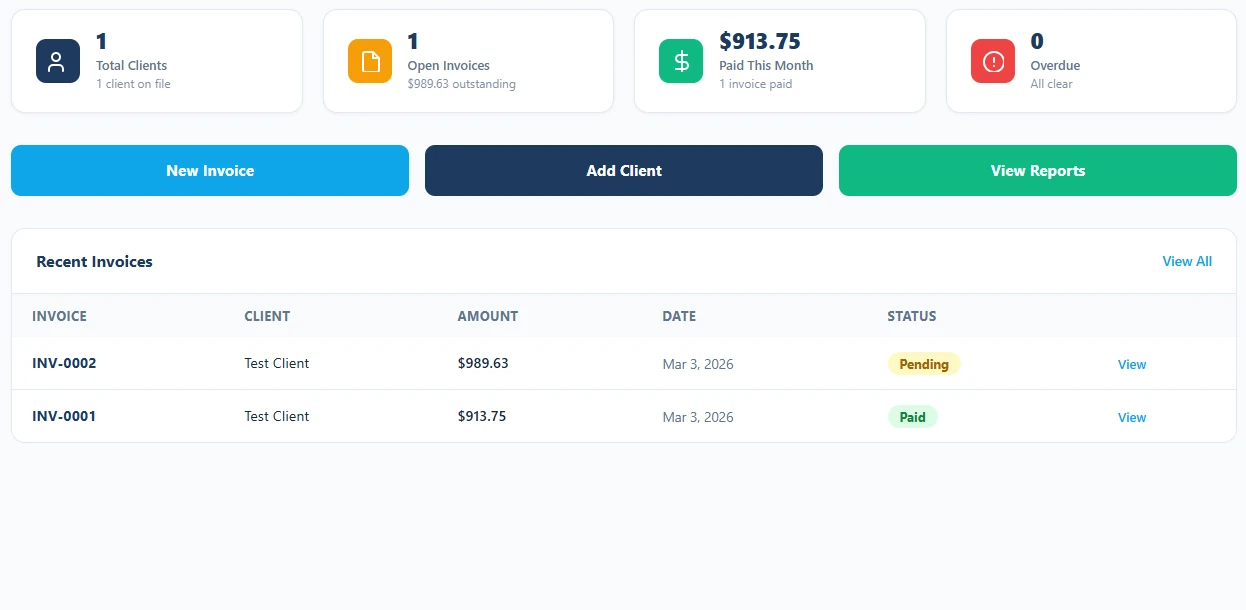
Always Know What You're Owed
Plumbing jobs pile up fast. The invoice dashboard shows every job and its status — Draft, Pending, Paid, or Overdue — in one clean list. Filter, sort, and update statuses so nothing gets missed and you never have to guess what's been collected.
Real Numbers for Your Plumbing Business
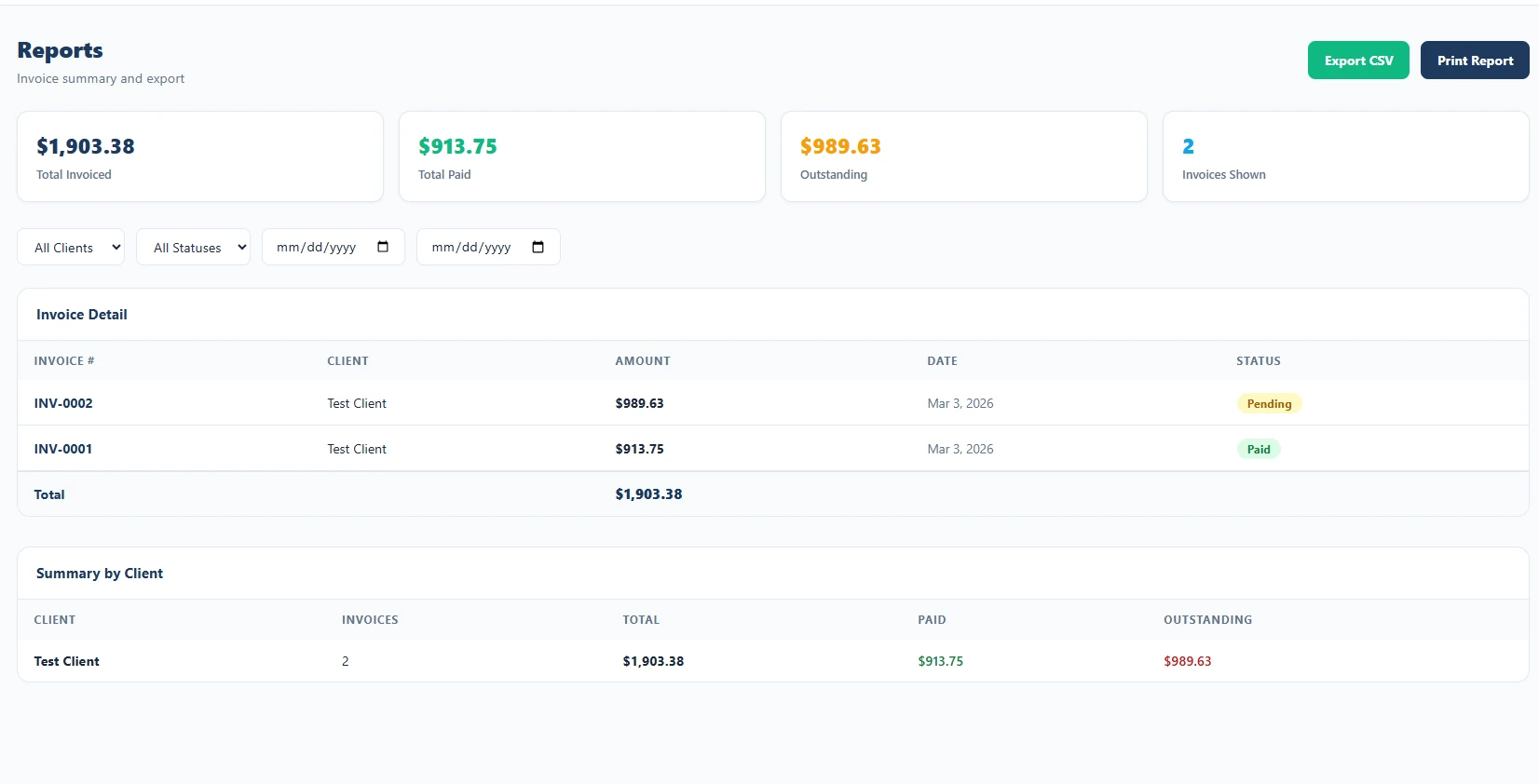
When tax season rolls around — or you just want to know how the business is actually doing — the Reports section has you covered.
- Revenue summaries by date range
- Filter by client or invoice status
- See total billed, collected, and outstanding
- Export data for your accountant or bookkeeper
- Spot your most valuable clients at a glance
Bring Your Crew In
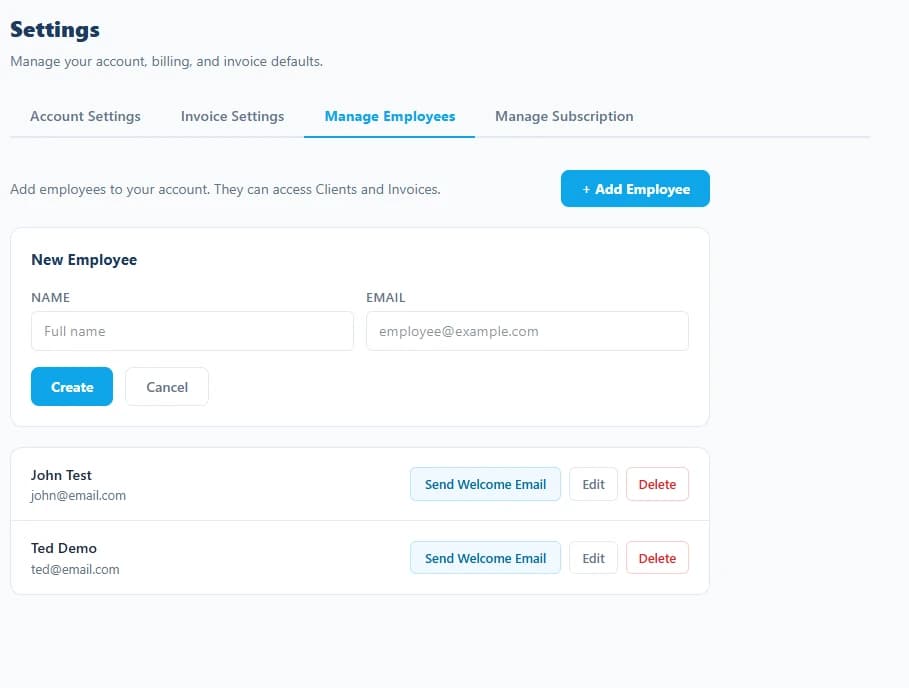
Running a crew? Invite employees so they can create and manage invoices on behalf of your business — all under your account, your clients, and your data.
- Invite employees by email — they sign in with their own account
- Employees access your client list and invoice history
- All invoices created by employees appear under your account
- Employee access is limited to clients and invoicing only
- Revoke access at any time from your Settings
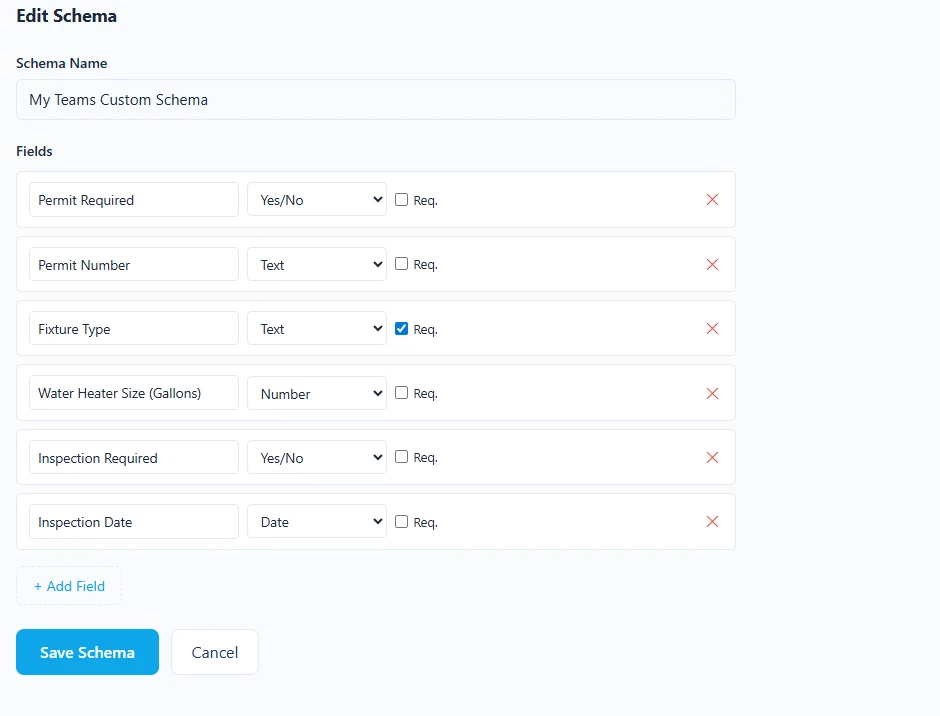
Fields That Fit How You Actually Work
No two plumbing businesses are exactly the same. Whether you specialize in new construction, service calls, or commercial work, the Schema Builder lets you define the exact data fields you need — and reuse them across every invoice. Change pipe materials? Add a field. Track job type for quoting? Add a field. Done in seconds.
Why Plumbers Choose ServiceInvoicing
Generic invoicing tools are built for everyone — which means they're built for no one. ServiceInvoicing is purpose-built for the trades.
Plumbing-Specific Fields
Capture permit numbers, fixture types, inspection requirements, and water heater specs without workarounds or notes hacks.
No Training Required
Sign in, pick a client, add your line items, choose your schema, and send. The whole flow takes under 5 minutes.
Professional PDFs
Your invoices come out looking polished every time — with your business info, logo-ready layout, and all job details included.
Works on Any Device
Create invoices from a job site on your phone, update statuses on a tablet, review reports on your desktop. It all syncs.
Built to Grow With You
Start free. Invite employees when you grow. Add custom schemas as your specialty evolves. ServiceInvoicing scales with your business.
Your Data, Always Available
All your clients, invoices, and reports are stored securely and accessible any time — no more digging through filing cabinets.
Plumbing Invoicing Questions, Answered
Can I put permit numbers and fixture details on a plumbing invoice?
Yes. The schema builder lets you add job-specific fields — permit number, fixture make and model, water heater serial, inspection date — that appear on the invoice itself. Set your plumbing schema as the default and every new invoice starts with those fields ready to fill in.
How do I bill for a service call plus parts on the same invoice?
Add as many line items as the job needs, each with its own quantity, unit, and rate. Bill labor by the hour, parts by the each, and a flat trip charge on one invoice. Subtotal, tax, and total calculate as you type.
Can I take a deposit on a large repipe or water heater job?
Yes. Enter the deposit received on the invoice and the balance due updates automatically, so the customer sees exactly what they have already paid and what is still outstanding on the final total.
Is there a free plan for a one-van plumbing operation?
The free plan covers 2 active clients and unlimited invoices with no credit card required. If you are a sole trader working mostly for a couple of property managers, that may be all you need. Paid plans start at $9/month for 10 clients.
Can my apprentice create invoices without seeing my books?
Yes. Invite employees by email on a paid plan and they sign in with their own account. They can work with your client list and create invoices under your business, but settings, billing, and reports stay restricted to you.
Ready to Run a Tighter Plumbing Business?
Join plumbers who have ditched the paper invoices and spreadsheets. Get started free — no credit card, no commitment.
Get Started Free TodayFree plan includes unlimited invoices. Upgrade any time.
Also built for these trades
ServiceInvoicing adapts to how each service business bills. See the version built for your trade.
Need a form instead of software? Download the free invoice template →