
Invoices That Include Everything a Moving Company Needs
Every invoice captures move-specific details alongside your labor and transport line items — move type, origin, destination, estimated volume, and crew size all on one professional PDF your customers keep for their records.
- Move type and origin/destination addresses per job
- Estimated volume and crew size documented on every invoice
- Labor, transport, packing, and assembly as separate line items
- Distance and crew hours clearly broken out
- Automatically included in your PDF invoice
Pre-Built for Moving Companies. Customizable for Your Operations.
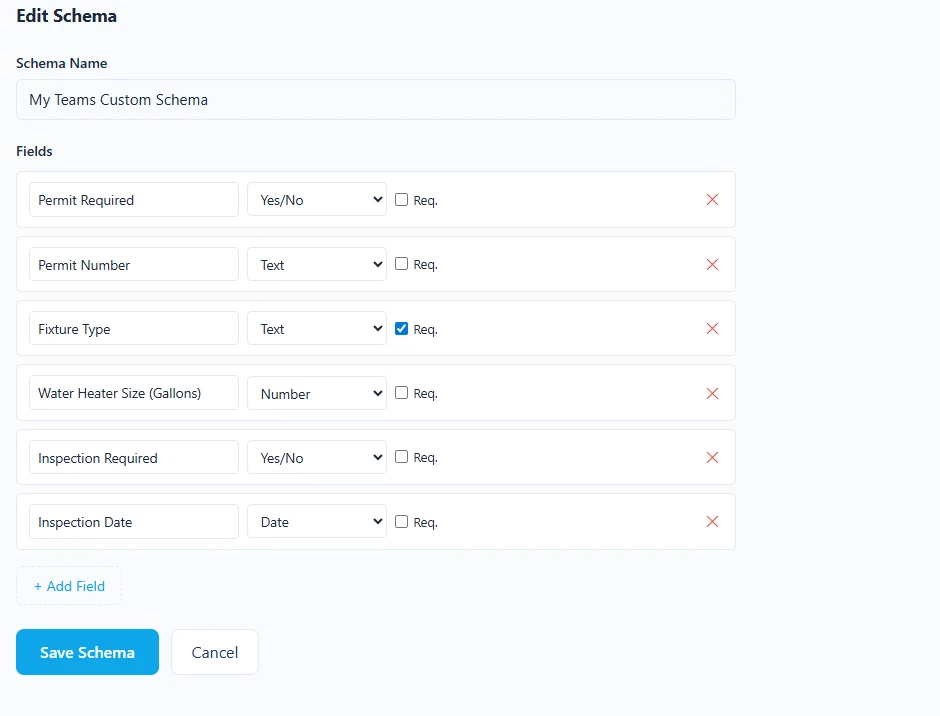
Our moving company schema comes ready to use out of the box. Need fields for storage duration, special item handling, or elevator access notes? Build your own schema in minutes.
Moving Company Schema — Ready to Use
The built-in moving schema includes fields for move type, origin address, destination address, estimated volume, and crew size. Select it on any invoice and those fields appear automatically — giving customers a clear record of their move.
Build Your Own Schema
Specialize in commercial relocations, piano or art moving, or short-term storage? Add custom fields for storage unit numbers, specialty item handling fees, elevator reservations, or any operational detail your jobs require — your schema, your invoice.
Customize Every Invoice
Choose your PDF theme, toggle which business details appear, set a default tax rate, and pre-select your preferred schema so every invoice starts perfectly.
Everything Organized. Nothing Slipping Through.
Manage your client book and invoice history without a filing cabinet or spreadsheet.
Client Address Book
Store business name, contact, phone, email, and address once. Pull it up on any new invoice instantly.
Invoice History
Every invoice ever created is stored and searchable. Go back and reference any job, any client, any date.
Payment Status Tracking
Mark invoices as Draft, Pending, Paid, or Overdue. See at a glance what you're waiting on and what's been collected.
PDF Download
Every invoice generates a clean, print-ready PDF. Email it, print it, or save it to your records.
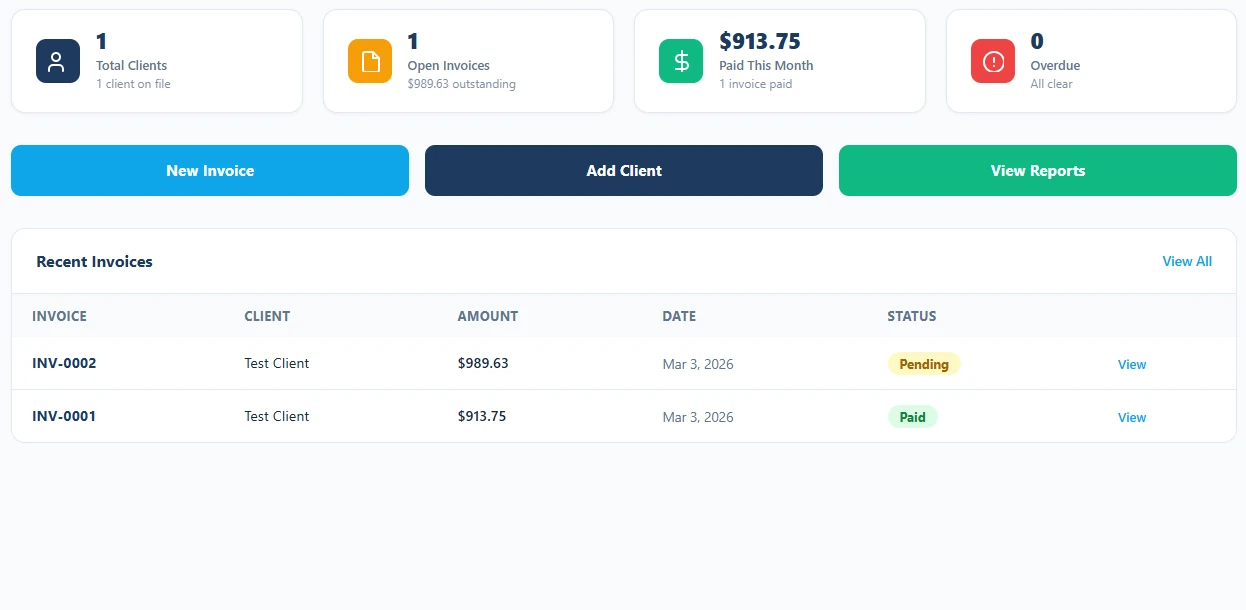
Always Know What You're Owed
Moving jobs often require a deposit up front with the balance due on delivery day. The invoice dashboard shows every customer and their payment status — Draft, Pending, Paid, or Overdue — so your dispatch team always knows which jobs are settled and which drivers need to collect before unloading.
Real Numbers for Your Moving Business
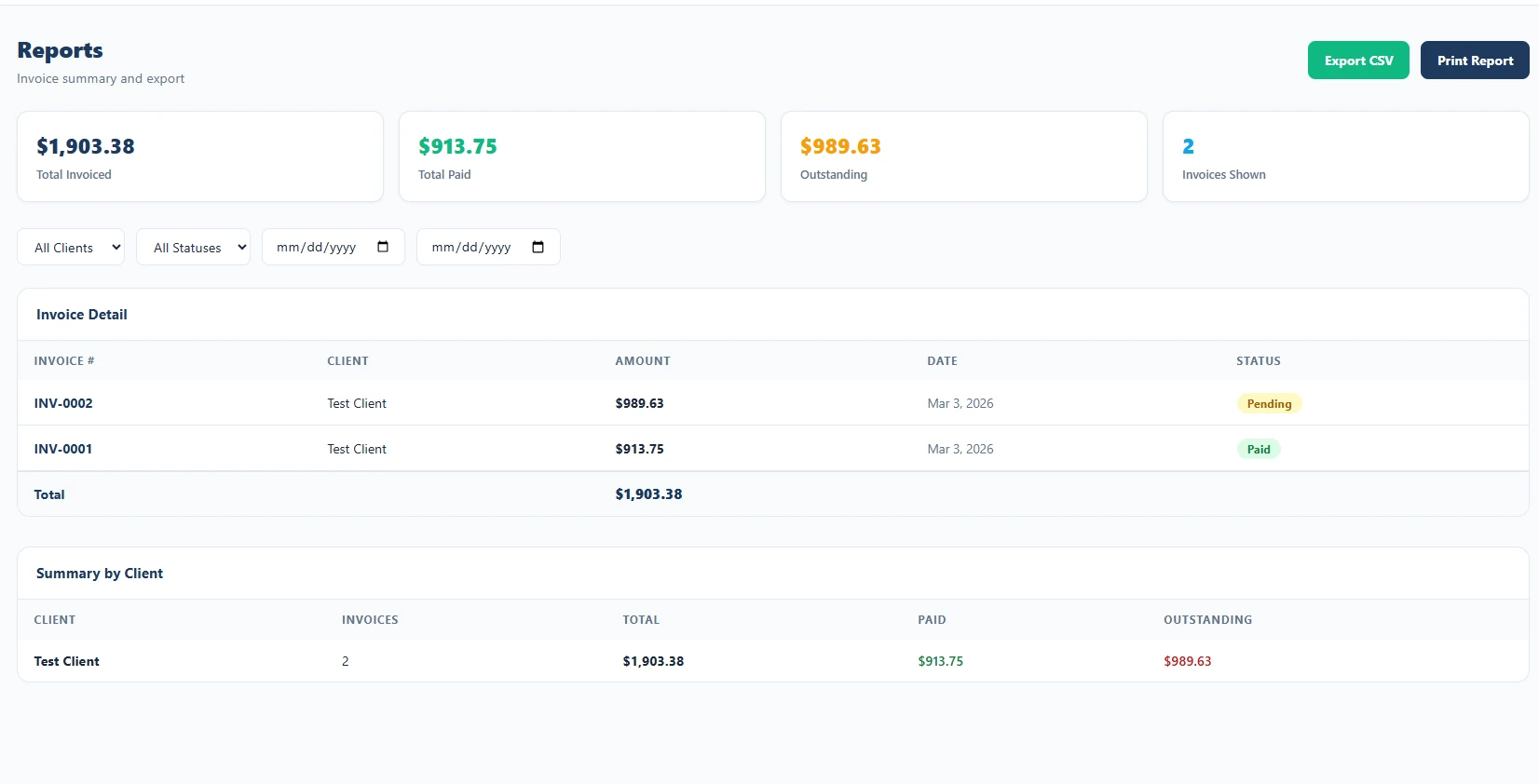
When tax season rolls around — or you just want to know how the business is doing — the Reports section has you covered.
- Revenue summaries by date range
- Filter by client or invoice status
- See total billed, collected, and outstanding
- Export data for your accountant or bookkeeper
- Spot your most valuable clients at a glance
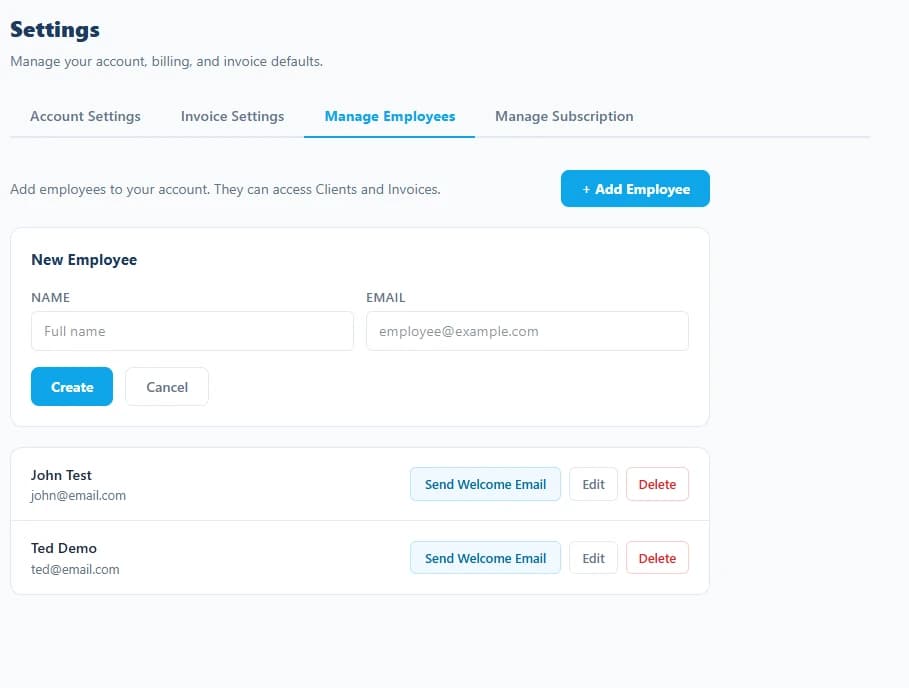
Bring Your Dispatchers and Crew Leads In
Running a moving company with multiple trucks, dispatchers, and crew leads handling jobs? Invite your team so they can create and manage invoices under your account — all tied to your customers and your revenue data.
- Invite employees by email — they sign in with their own account
- Employees access your client list and invoice history
- All invoices created by employees appear under your account
- Employee access is limited to clients and invoicing only
- Revoke access at any time from your Settings
Fields That Fit How You Actually Work
No two moving companies run exactly the same jobs. Whether you focus on local residential moves, long-distance relocation, or commercial office moves, the Schema Builder lets you define exactly the job details your invoices need and reuse them across every customer.
Why Moving Companies Choose ServiceInvoicing
Generic billing tools can't capture the job details moving customers expect to see on a professional invoice. ServiceInvoicing is built for businesses that bill by the hour and the mile.
Move-Specific Fields Built In
Capture move type, origin, destination, estimated volume, and crew size without squeezing job details into a notes field no customer wants to read.
Labor, Transport, and Materials Line Items
Bill loading hours, long-distance transport, packing materials, and furniture assembly as separate line items — clear and easy for customers to understand.
Professional PDFs That Build Customer Confidence
Your invoices come out clean and detailed — with your company name, contact info, and all move details on one organized document customers can keep for their records.
Works from the Truck or the Office
Send invoices from the job site before you pull away, update payment status from your phone on the road, and review weekly revenue back at the depot.
Built to Scale With Your Fleet
Start free with your first truck. Invite dispatchers and crew leads as your operation grows. Add custom schemas for specialty moves as your services expand.
Complete Customer and Job History
Every customer, every move, every invoice is stored and searchable — so you can pull up prior job details, check delivery addresses, or resend a receipt instantly.
Moving Company Invoicing Questions, Answered
Can I bill by the hour with a crew size?
Yes. Add a line item for crew hours with the hours as quantity and your hourly crew rate, plus separate lines for truck fees, materials, and stairs or long-carry charges.
Can I record origin and destination addresses?
Add fields for origin, destination, move date, and inventory reference through the schema builder, so the invoice matches the job even when the billing address is different again.
How do I invoice a deposit at booking?
Record the deposit received on the invoice and the balance due updates automatically, so the customer sees the deposit credited against the final total on move day.
Can I bill packing materials separately?
Add each material — boxes, tape, wrap, mattress bags — as its own line item with a quantity and unit price, so customers can see what they were charged for rather than a lump sum.
Can I get customers to sign terms before the move?
Yes. Send a contract covering your terms, liability limits, and cancellation policy, and collect the customer's signature through the client portal.
Ready to Run a More Professional Moving Company?
Join moving companies who have replaced handwritten job tickets and paper receipts with one clean invoicing system. Get started free — no credit card, no commitment.
Get Started Free TodayFree plan includes unlimited invoices. Upgrade any time.
Also built for these trades
ServiceInvoicing adapts to how each service business bills. See the version built for your trade.
Need a form instead of software? Download the free invoice template →